Building Hella! Pads: generative audio inside a DAW
How I built an eight-pad instrument with Stability AI, JUCE, and Rive, from cloud sample generation to playback, editing, and export.
By Dave Sebek

Generating samples inside a DAW
I built Hella! Pads to generate and play samples inside a digital audio workstation, or DAW. You describe a sound, listen to the result, trim it, and save it to a pad. You can also drag the audio into a track.
The instrument has eight pads and runs as an Audio Unit, VST3, or standalone application on Apple Silicon Macs. JUCE and C++ handle the audio engine. Stability’s Stable Audio 3 generates the samples, React handles the editor, and Rive supplies the animated controls.
I wanted to make it easier to try a sound in the track you’re already working on. A prompt might describe a kick drum, a metallic impact, or a short musical phrase. You can generate a few candidates and hear them through the plugin’s output, including the master volume and any effects on the DAW track, before deciding which to keep.
Generating and editing a pad
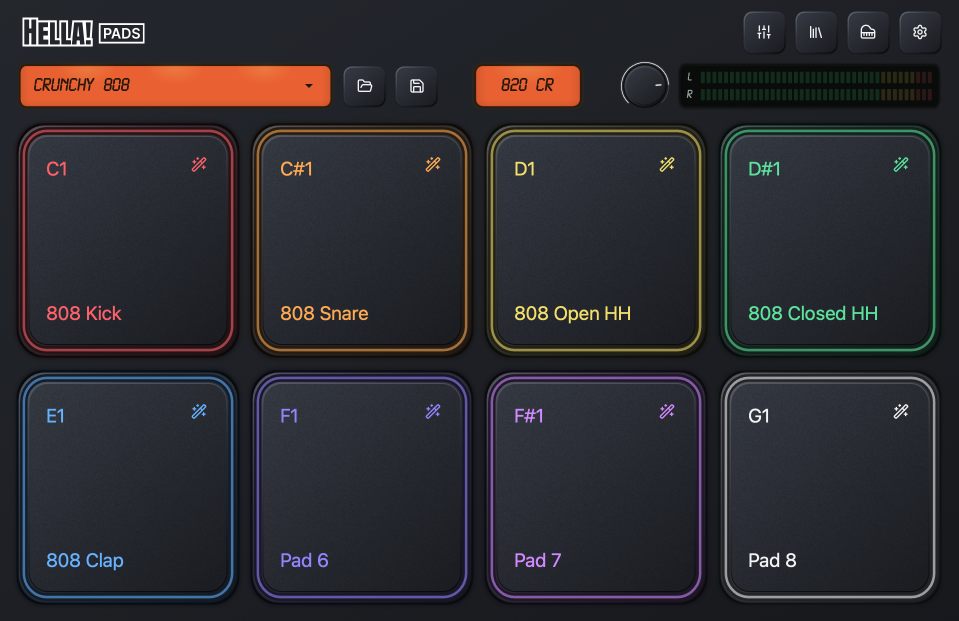
Each pad holds a one-shot sample with its own MIDI note and playback settings. The MIDI note determines which key triggers the sample. It doesn’t change the pitch.
On an empty pad, you choose Instrument, Music, or SFX, enter a prompt, and request between one and thirty seconds of audio. You can listen, regenerate, and adjust the playback range before saving. On a populated pad, a new generation stays in preview until you save the replacement.
Trying another snare shouldn’t remove the one already playing in your track. I kept configuration, trimming, and generation as separate save actions so each edit applies only the changes from that tab.
Keeping generation off the audio thread
The audio engine processes sound in small blocks, and each one has to finish on time to avoid glitches. The audio callback is the function responsible for filling each block. Network requests, file operations, and WAV decoding can’t run there. Hella! Pads does that work on a separate worker thread and passes prepared sounds to the audio renderer.
Replacing a sample also means freeing the old one. It has to stay alive while the renderer is using it, and releasing a large buffer can delay the audio callback.
The engine prepares a replacement sample bank on the worker and publishes it through an atomic pointer, which lets the threads safely exchange the reference to that bank. At the next block, the renderer takes the pending bank and acknowledges its sequence. The worker uses that acknowledgement and retained sound references to collect retired data. If a newer bank replaces one the renderer hasn’t taken yet, the worker can reclaim the unused bank separately.
This lets the saved pads keep playing while another sample is generated and prepared. Sample preparation and disposal both stay on the worker.

Handling generation requests
The plugin submits a request, stores the generation ID, and polls for the result. Once the WAV arrives, it validates the audio and prepares it for preview. Each instrument instance runs one generation at a time.
A failed connection during submission needs particular care. The service may have received the request even if the plugin didn’t receive a response. Automatically submitting it again could create another billable job, so the client reports the uncertainty and leaves the decision to the user. When the job ID is known, retrieval can resume with that ID.
A DAW session can retain a pending job for later retrieval, provided the result is still available from the service. Kit presets contain completed sounds and exclude pending jobs.
Closing a drawer or changing kits can leave a generation running for an edit that’s no longer open. I used draft identifiers and revision checks to prevent its result from changing the next editing session.
Connecting React to JUCE
The editor started with native JUCE controls. I moved it to React, shadcn/ui, and Tailwind inside JUCE’s WebView to build the forms, drawers, and sample browser while keeping audio processing in C++.
CMake builds the frontend and embeds the HTML, JavaScript, CSS, fonts, Rive assets, and WebAssembly runtime in each plugin bundle. JUCE serves those files locally, so the installed editor doesn’t need a web server. New generations require an internet connection; saved samples play offline.
React sends commands through a native bridge. C++ validates them and publishes state back to the editor. The processor owns the kit data, and the state snapshots exclude credentials.
During development, the native editor was sending state and meter updates before the browser had initialized its bridge. I added a readiness handshake: React installs its subscriptions, requests the initial state, and then the native side begins its periodic updates. Navigation resets that readiness state.
A Keychain lookup caused another startup ordering problem. It could delay kit restoration by waiting ahead of it on the worker queue. Moving the lookup to a separate asynchronous operation let restoration and editing proceed. The worker adopts the saved key when the lookup finishes, unless the user has already connected or disconnected explicitly.
Building the Rive controls and mixer
I used Rive for the textured pad faces, illuminated edges, orange displays, meters, and press animations.
Pad animations respond to native hit counters sent with the meter updates, so MIDI notes trigger the same feedback as mouse presses. The face moves inward, the bevel lighting reverses, and the shadow recedes before returning to idle. Reduced motion uses a light pulse.
HTML buttons handle focus, keyboard access, and pointer input. Rive draws the artwork. If an asset fails to load, the HTML control remains available with its fallback appearance. Text that changes, such as the preset title, stays in HTML over the Rive background.
The controls share a loaded Rive file and its textures. Each control has its own state machine and view model, allowing it to respond independently without decoding a separate copy of the file.
The mixer adds eight channels of faders, pan controls, stereo meters, mute and solo buttons, and sample previews. Each Rive skin sits inside its corresponding HTML control, and CSS arranges them in a grid.
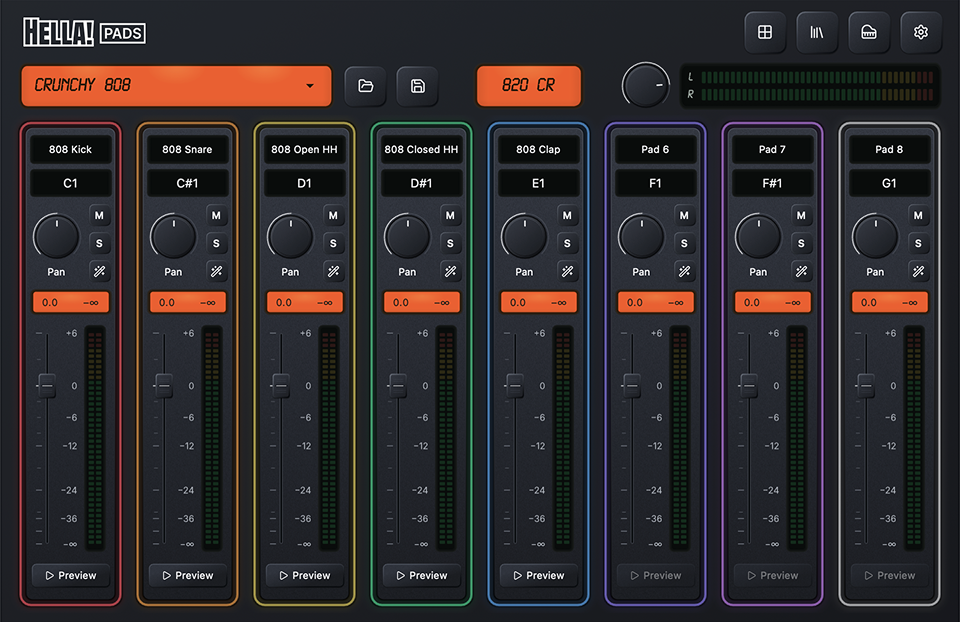
Keeping layout in CSS means resizing doesn’t require repositioning controls inside a large Rive canvas. The mixer initializes on its first visit and keeps its instances for subsequent visits. Animations and meter subscriptions pause while another view is visible.
The fader uses tapered travel to give more space to useful mixing levels. Pointer movement, artwork, the fallback thumb, and scale marks all use the same mapping. Saved values and host automation remain in decibels.
Preserving samples and edits
Trimming stores a playback range over the original WAV. The original audio remains available so you can move the boundaries again later.
When a selection ends before the original sample does, playback adds a fade of up to five milliseconds to avoid a pop at the cut. For very short selections, the fade is limited to the final half. Playing through the original ending doesn’t add a trim fade.
Presets and DAW state embed the sample audio. This makes saved files larger, but it means a kit can reopen offline without locating a temporary download or retrieving the sound from the generation service.
Credentials stay separate from the audio. Users can connect for a session or explicitly save a key in macOS Keychain. Keys are excluded from presets and DAW projects.
The optional Outtakes feature retains unused generations as WAVs. A sound that doesn’t fit the current pad can be kept for another project without generating it again.

Exporting WAVs on demand
Dragging a sample into a DAW requires an actual file. An early version prepared export WAVs while browsing saved samples, which caused files to accumulate even when they weren’t exported. I changed it to return metadata while browsing and prepare the WAV only after a drag begins.
The worker renders the selected range and prepares the native drag. Export identity includes the audio and trim information, so repeated exports can reuse a matching file. Before exporting a stored sample, the plugin checks that it hasn’t changed since it was displayed. If it has, the user needs to refresh the list.
You can also export an unsaved edit or generated preview without saving it to the kit. Exported WAVs include the selected trim and end fade. They exclude the plugin’s master volume and effects applied by the DAW.
The plugin retains exported files because another application may still refer to them. Settings shows their storage usage and provides an explicit cleanup action.
Preparing the installer
I automated the macOS release steps: building the AU, VST3, and standalone bundles, checking their metadata and dependencies, signing them, and creating a notarized installer. The release records include file hashes and the source revision.
I added a check for stale embedded frameworks after earlier experiments left files in the build bundles. The release now rejects those leftovers before signing.
Try Hella! Pads
I built Hella! Pads around getting a generated sound into a track. You can hear it alongside the music you’re making, shape it, and play it from MIDI without leaving the session. When you save the project, the audio stays with it, ready for the next time you open it.
You can find Hella! Pads and its documentation on the Hella! Plugins website.
- Audio engineering
- JUCE
- Generative audio
- Interaction design
- Rive