Building InterimAPI: a working API before the backend
How I built a tool for prototyping with realistic data, from configurable generators and SQLite databases to REST queries and a visual schema builder.
By Dave Sebek

Starting with the data a project needs
I built the first version of InterimAPI to solve a problem I had at Draftbit. I needed a quick way to spin up APIs with realistic fake data for demo apps I was building for product marketing, including videos, and for app templates. I wanted to define the fields each app needed, populate them with data, and start building against a working API.
I ended up building it out into a service that other people could use and shared it on Product Hunt. At Draftbit, we also used it for product testing, example apps and screens, and tutorials. Designers and developers could work against the same data model while the backend was still being built.
I wanted to test interactions that a static mockup couldn’t cover: saving an edit, searching a collection, moving through pages of results, and handling a failed request.
InterimAPI launched in 2022. It was retired on June 1, 2026; the website and documentation remain available.
Defining an endpoint visually
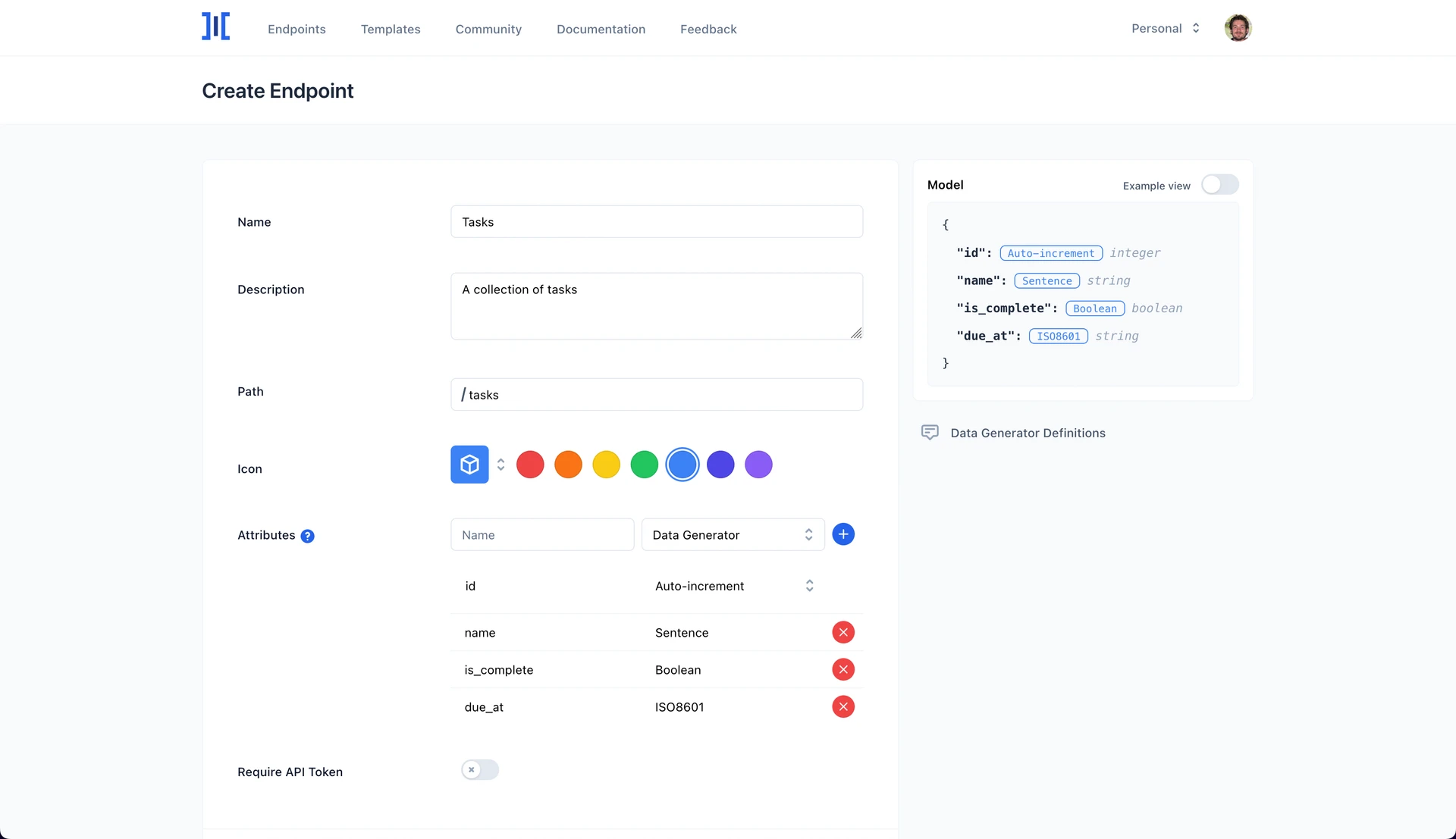
The setup followed the structure of a small database. A workspace belonged to a project. An endpoint represented a table, and its attributes represented columns. Each attribute had a name and a generator that supplied its initial values.
For a task list, you could define a name field with a phrase generator, is_complete with a boolean generator, and created_at with a Unix timestamp generator. The identifier could use an auto-incrementing number or a UUID. Saving the endpoint created the table, filled it with generated records within the account’s allowance, and made the REST paths available.
Templates provided starting schemas, and an existing endpoint could be duplicated. The builder showed the object model alongside the fields, with an example view for seeing what the values would look like. This let someone check the shape of a response before connecting an app to it.
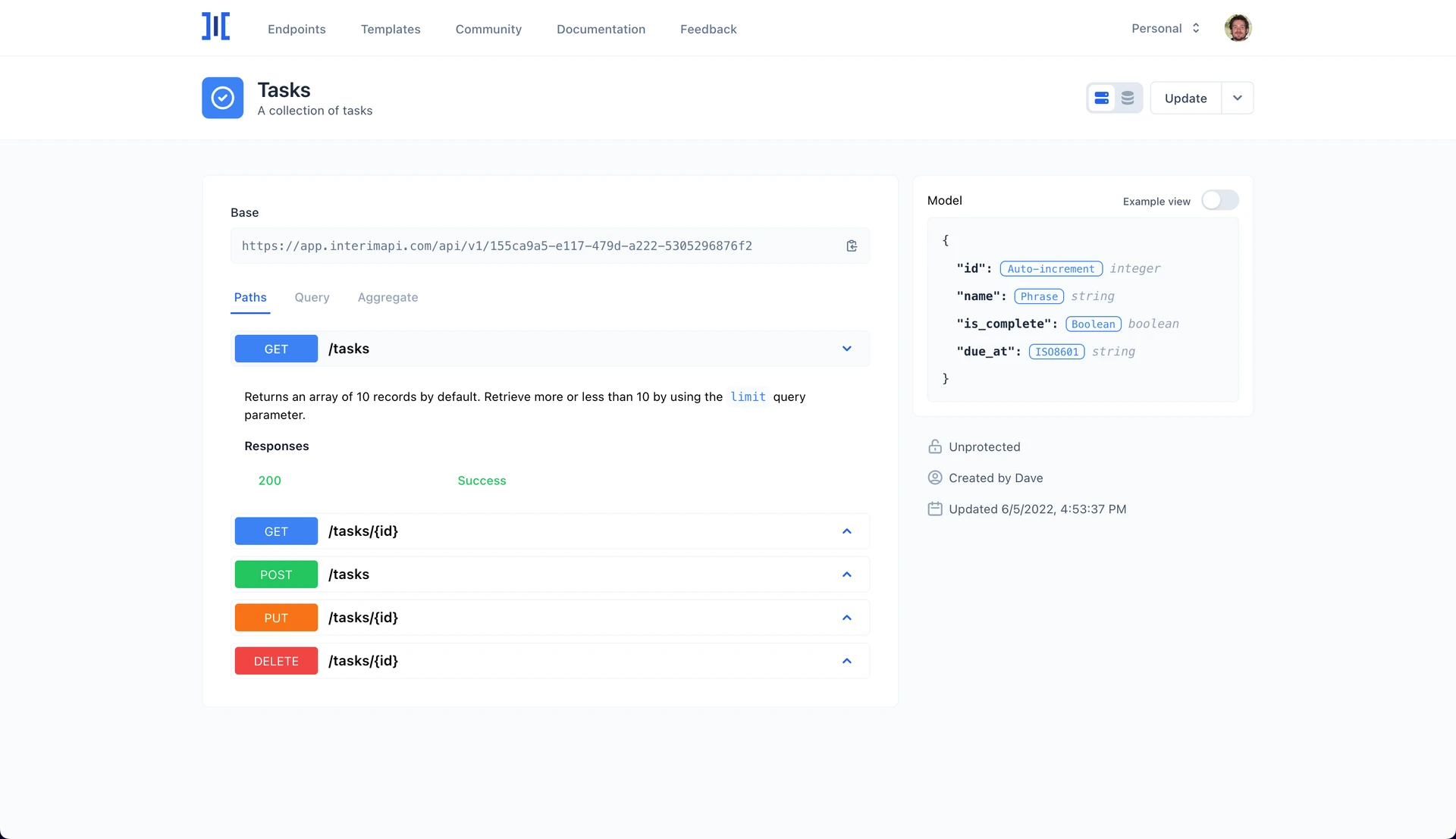
The API view kept the workspace’s base URL, endpoint paths, query options, aggregate functions, and model preview together. The Data view showed the actual stored rows. You could inspect the definition, then switch views to see what had been generated.
Turning definitions into database tables
I built the application with Laravel 8, Vue 3, Inertia, and Tailwind. Inertia connected Laravel’s server-side routes and controllers to the Vue interface. Jetstream supplied the account and team foundation, Sanctum handled API token authentication, and Spark handled subscriptions. The data generators used FakerPHP.
The application stored endpoint definitions separately from the records those endpoints served. Definitions included the public path, identifier configuration, and attributes with their generator options. Each workspace had its own SQLite file, and each endpoint became a table inside it.
When creating an endpoint, Laravel’s schema builder translated the attributes into database columns. Boolean generators used boolean columns; number and price generators mapped to integer or decimal columns; JSON generators had their own mapping. Other values used text columns. A table’s internal name used the endpoint’s UUID, while the public API exposed the path chosen in the builder.
The generator then produced values for each attribute and inserted the rows. Subsequent API reads queried that stored data. They didn’t generate a fresh collection on every request, so a frontend could load a record, change it, and retrieve the changed version later.
To restart a demo or test, you could regenerate the endpoint’s data. That cleared its rows, including any edits, and populated it again from the attribute definitions.
Changing a schema could also rebuild the table, dropping its records, recreating the columns, and generating new data. I built that path for disposable prototype data; it didn’t preserve existing records through a rebuild.
Building custom generators
The built-in generators covered names, addresses, dates, prices, text, colors, identifiers, and other common values. The public site listed 66 generators. Configurable options let some of them produce a particular date format, text length, or price range.
There were still useful values that didn’t fit a single generator. A custom generator let you combine literal text with generated fragments. For example, the text Ticket , a generated digit, and the text is ready could produce Ticket 7 is ready.

The saved definition was an ordered list of blocks. Each block identified either literal text or a generator. On the server, the custom generator walked that list, appended the text directly, called the selected generators, and joined the results into a string.
I iterated on the builder through May 2022, changing the flow, adding support on the edit screen, and improving output previews and validation. The final interface used a panel where users could add text and generator elements and see an example of the assembled value.
The builder checked for empty blocks, missing attribute names, and names that conflicted with the endpoint’s identifier. I also updated the object-model preview to show the combined output of a custom generator.
The preview illustrated the format. Individual generated values could change when the database was populated.
Testing frontend behavior through REST
Each endpoint supported reading a collection or individual record, creating records, updating a record, and deleting it. A frontend could use ordinary HTTP requests without a dedicated InterimAPI SDK.
The collection route also translated query parameters into Laravel query-builder operations. Filters supported comparisons such as equal, less than, between, and partial text matches. Sorting, field selection, searching, grouping, and pagination were available, along with count, minimum, maximum, average, and sum.
For a task list, you could make these requests against the workspace’s base URL:
GET /tasks?where[is_complete][eq]=0&sort=created_at&order=desc
GET /tasks?paginate=20&page=2
GET /tasks?where[is_complete][eq]=1&count
The first retrieves incomplete tasks ordered by their creation time. The second requests a page of records with pagination metadata. The third returns the number of completed tasks. The query reference documents the available parameters.
Those operations gave a prototype enough behavior to build a filter control, a paginated list, or a summary count against the same dataset. The API could also return a requested HTTP status through a status query parameter. A request such as GET /tasks?status=500 let a developer exercise an error state deliberately.
Application-specific business rules, permissions, and integrations still needed their own backend implementation.
Keeping generated data useful
The generated values needed the right database types for sorting, calculations, and use in components such as maps. In May 2022, I added decimal storage for latitude and longitude, along with separate JSON-column handling for JSON and coordinate generators.
Each field was generated independently. A generated email wouldn’t necessarily match the name beside it. The generator labeled Foreign Key selected a number from a range without looking up a record in another table, so it couldn’t guarantee a valid relationship.
Handling workspaces and account limits
Workspaces organized endpoints and supported collaboration. Every account had a personal workspace, and eligible plans could create shared workspaces with invited members. A workspace could require bearer-token authentication across its endpoints, or an individual endpoint could require it separately.
The application also tracked stored-record allowances and limited requests per endpoint according to the workspace owner’s plan. Creating, regenerating, and deleting data had to update the record count. API writes needed to participate in that accounting too.
A June 2022 fix addressed an assumption in the API’s create-record path. It retrieved the record total from the authenticated user, but a public endpoint could accept a request without a signed-in user. The fix used the workspace owner’s record count when no authenticated user was present.
How people used it
On Product Hunt, Brian Luerssen described using InterimAPI at Draftbit to work with a realistic data model before a backend existed. Georges Duverger described using it for test and demo mobile apps, including its custom generators and query functions. Joyce Kettering described using it to prepare data for frontend tutorials. Those accounts are still on the Product Hunt listing.
Those uses were close to the problem I had started with at Draftbit. We could put a working screen in front of someone, let them change its data, and see how the interaction held up before the backend was ready.
InterimAPI is now retired. The documentation remains available for anyone interested in how the endpoint builder, generators, and query API worked.
- Developer tools
- Laravel
- Vue
- API design
- Prototyping