Building Trident: a shared workspace for AI and documents
How I built a desktop workspace for drafting and reviewing with different AI models, with local documents, semantic search, and direct provider connections.
By Dave Sebek

Working around a document
I built Trident for work that develops over several conversations: a specification, a research project, a book, or a set of course materials. The document stays in the center of the workspace, with an AI conversation on either side. Each conversation can use a different model.
You can ask one model to draft a plan, attach that document to the other conversation for review, and have either model make changes. You can also edit the document yourself. The conversations have separate histories, so sharing a document gives the second model the material to review without requiring it to follow the first model’s entire conversation.
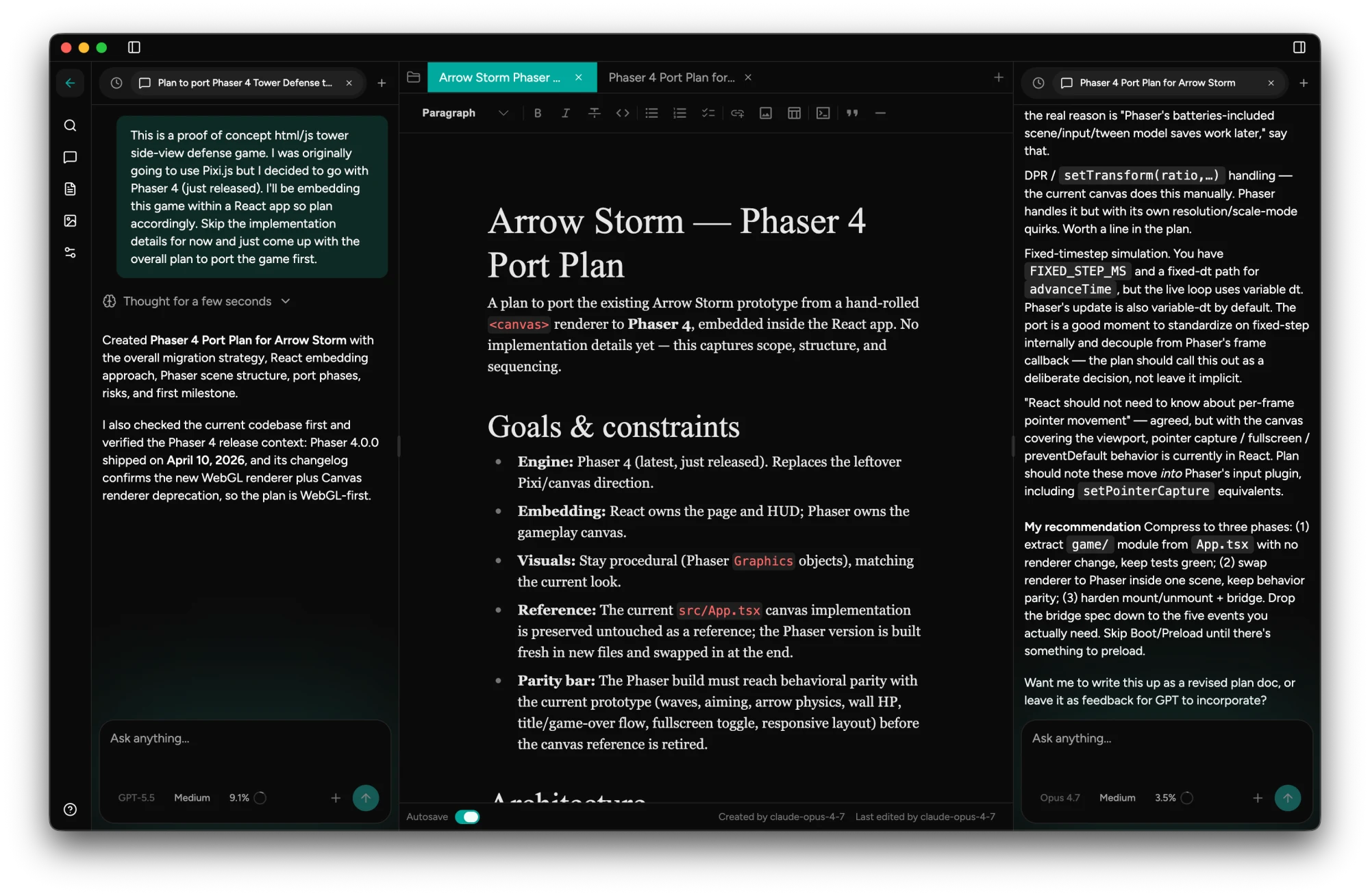
In the example above, I kept the proposed game port open while a second model reviewed its assumptions and called out missing details.
Building the desktop application
The current desktop code grew out of a Laravel application. Porting it meant preserving the project and document workflow while moving the server and storage onto the user’s machine.
Electron supplies the desktop shell, native menus, windows, notifications, and update integration. React handles the interface. An Express server bound to the loopback address handles the application’s API, and the Vercel AI SDK handles model requests, streaming, and tool calls.
I used Milkdown’s Crepe editor for rich editing of Markdown, including headings, lists, tables, and code blocks.
The data layer uses PGlite, an embedded Postgres database, with Drizzle for queries and schema access. Projects, conversations, messages, document content, and image records live there. The pgvector extension stores embeddings for semantic search. Users don’t need to install or administer a database server.
Trident also writes documents as Markdown files under ~/Trident/. The database supports the application’s relationships and queries, while the files make the writing accessible in an ordinary editor. That duplication creates work: document creation, renaming, and editing have to update both representations.

Giving models access to the work
The models work through tools for searching, reading, creating, renaming, and editing documents. Those operations are scoped to the current project. An edit uses the document’s identifier, checks that it belongs to the project, and writes the replacement Markdown content.
An attached document includes its identifier and content in the conversation. That lets a model edit a document created by another model without treating the title as a filesystem path. Trident records who created the document and who last edited it, and includes those fields in the Markdown file’s frontmatter.
Each model edit replaces the whole document. Trident doesn’t merge simultaneous edits, so revisions need to happen in sequence.
Projects can also have a local working directory. In that case, the models get tools to list directories, read files, and search file contents. These tools use project-relative paths, check resolved paths against the workspace root, and respect ignore rules. Reading a codebase and editing a Trident document are distinct operations.
I added collision checks after finding that renaming a document could overwrite an existing file. I also added validation for model-created filenames and project membership checks for document access.
Saving a streamed conversation
A message can contain text, reasoning, tool calls, tool results, and usage metadata. Later turns need that history, including the tool activity behind the visible answer.
Trident persists the AI SDK’s structured message parts. The response stream uses the SDK’s finish callback to save the resulting messages. That lifecycle fixed a race where closing the response could leave the last assistant message unsaved.
Another bug involved document attachments. The server adds document content to the user message, but the browser’s copy can contain only the user’s typed text. Writing that browser copy back over the stored message removed the attachment. The persistence path now preserves existing user messages while allowing assistant tool results to be updated.
Stopping a response also has to reach beyond the interface. When the client disconnects from an unfinished response, the server aborts the model request. Otherwise, the display could stop while the provider continued generating and using tokens.
Finding material by meaning
As a project grows, finding a document by its filename becomes limiting. Trident can index document contents and search for related passages using embeddings, which represent text as vectors for similarity comparison.
The chunker divides the document into passages using the first three levels of Markdown headings. Each passage keeps the headings of the sections it belongs to, so search results retain that context. Longer sections split at paragraph boundaries, with a target of roughly 512 estimated tokens per chunk. That’s a target rather than a hard limit: a single oversized paragraph stays intact.
A search turns the query into a vector and ranks chunks by cosine distance, a measure of how closely the vectors point in the same direction. It filters out weak matches and returns each document once with its strongest matching passage. The similarity floor addresses a practical problem in small projects: asking for the nearest results can return unrelated documents simply because there aren’t many candidates.
I queued indexing work per document so an older request couldn’t finish after a newer one and leave stale chunks in place. Replacing a document’s chunks happens in a database transaction, keeping a partially rebuilt index out of search results.
The index is stored locally, but the embedding computation uses OpenAI’s text-embedding-3-small. Enabling automatic indexing sends document chunks to OpenAI when documents are saved or edited. Semantic searches send the query there too, independently of the model selected for chat. Image indexing uses the image’s name and generation prompt, rather than an embedding of its pixels.
Keeping the model picker accurate
Provider support introduced a different maintenance problem. Trident connects directly to Anthropic, OpenAI, and Gemini, and also supports configured models and deployments through Bedrock, Vertex AI, and Azure OpenAI.
A model’s name alone doesn’t tell the application how to call it. The provider connection, deployment identifier, supported inputs, reasoning controls, token limits, and pricing all affect the request or the interface.
Earlier versions combined live model discovery with LiteLLM pricing and manually maintained capability rules. I moved the shared metadata to models.dev while retaining provider discovery and configured deployments. The catalog supplies information about a model; the provider connection determines how Trident reaches it.
For direct connections, Trident fetches model lists from the provider and adds catalog metadata where available. Bedrock, Vertex, and Azure use the user’s configured entries. A model missing from the catalog remains selectable. A catalog omission shouldn’t prevent someone from using a model their connection supports.

The catalog is available from a bundled snapshot at startup. Trident can load a newer validated disk cache, then attempt a background refresh with an eight-second timeout. A failed request or invalid response leaves the last valid catalog in use. Successful refreshes write through a temporary file before replacing the cache.
Provider discovery has its own fallback behavior. A failed request can reuse the previous model list, or compatible catalog entries when no previous list exists. A successful response containing no models stays empty. Treating an empty response as a failure would invent availability the provider hadn’t reported.
In the picker, I kept a reported price of zero separate from a missing price and let context limits appear even when pricing was unavailable. Rates stay scoped to the provider instead of borrowing a price from another service with a similar model name. The cost display estimates spending from recorded usage and available rates; the provider’s bill may differ.
Handling credentials and distribution
The renderer sends requests to the local API with a secret generated for that app launch. Provider credentials stay in the main process and are encrypted at rest using Electron’s operating-system-backed secure storage. Trident sends AI requests directly to the configured provider without an Eastechs proxy.
Packaging exposed a problem that development didn’t: a runtime dependency was available in the development checkout but missing from the shipped application. I added checks for undeclared runtime imports and for module resolution inside the packaged app.
The macOS distribution workflow builds, signs, and notarizes the app and prepares a draft release. The installed app uses electron-updater with a separate GitHub release repository. Keeping the release in draft allows the artifacts and update metadata to be checked before they become visible to the updater.
Working across models
A Trident project keeps the document and the conversations that shaped it together. I can bring a different model into a review, revise the draft myself, and pick up from the saved work later. The Markdown files also remain available outside Trident, so the writing can move into another editor when the project calls for it.
The app is available at tridenthq.app, and the source is on GitHub.
- Desktop applications
- Electron
- AI
- Local-first software
- Interaction design