Building Textend: a native Mac text expander
How I built a Mac text expander, from its snippet library and template previews to overlapping keywords, text insertion, and iCloud sync.
By Dave Sebek

Keeping frequently used text close
I built Textend as a native Mac app for saving text and inserting it with a short keyword. An email signature, a repeated reply, or the structure of a command can live in a snippet library. Type the keyword in another app, and Textend replaces it with the saved text.
The library uses SwiftUI and AppKit, with SwiftData for storage. Collections and favorites help organize snippets, and search narrows the list. The editor sits beside a preview so you can see what a template will produce while you’re working on it.
Closing the library window leaves Textend running in the menu bar, where expansion can be paused or resumed. A snippet doesn’t need a keyword if you only want to find it in the library and copy it manually.
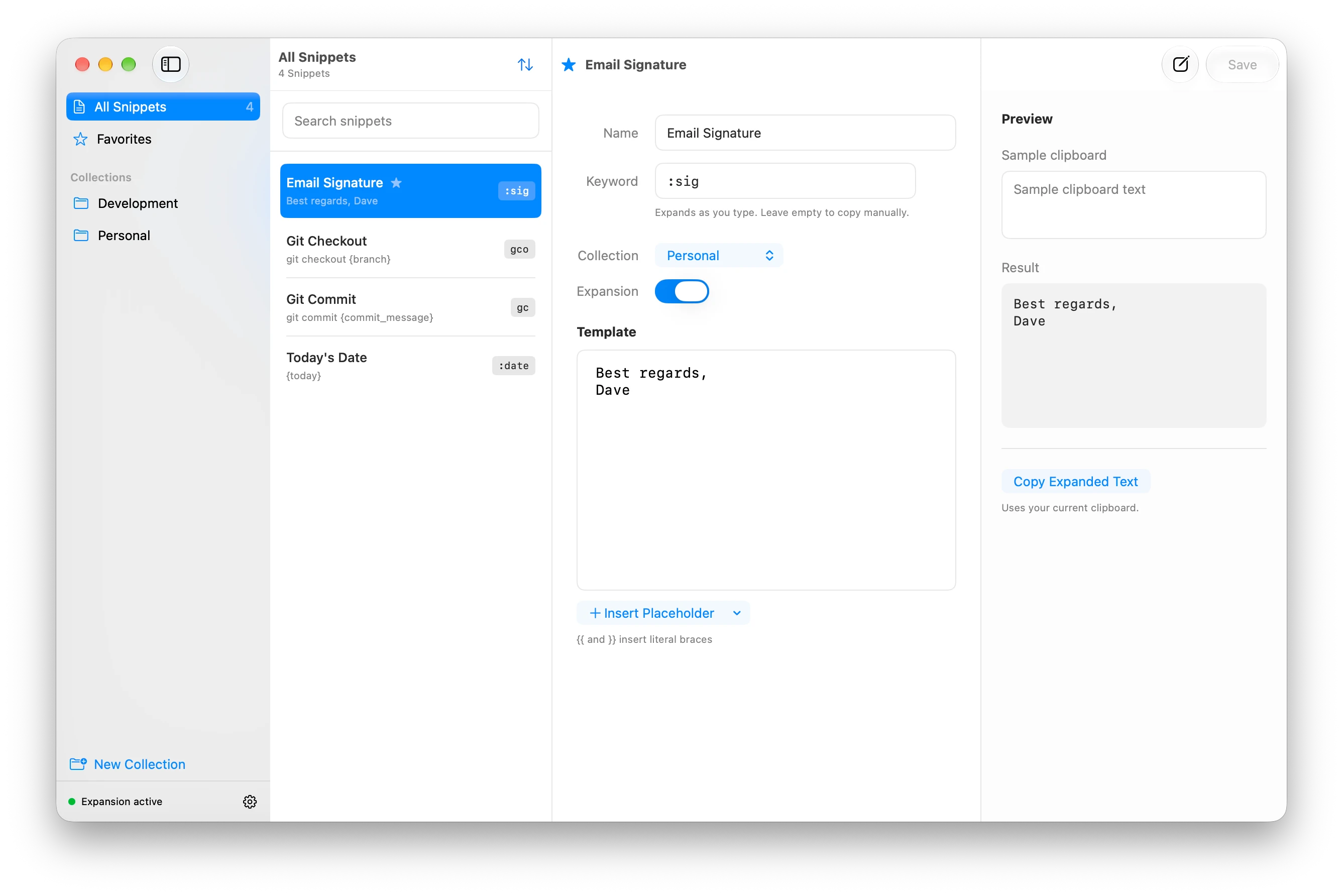
Previewing templates
A snippet can contain plain text or placeholders that resolve when it’s expanded. Each named placeholder uses either the clipboard or a formatted date and time. A template with {today}, for example, can insert the current date using a format chosen in the editor.
The preview has its own sample clipboard field. That lets you try a template with different input without changing the Mac’s clipboard. Copy Expanded Text uses the actual clipboard, as does keyword expansion. Both go through the same template resolver as the preview.
Clipboard placeholders also work with copied files, inserting their full paths into the template.
The special {cursor} marker sets where typing should continue after expansion. For a command template, that might be between a pair of quotation marks:
git commit -m "{cursor}"Textend removes the marker and places the caret between the quotes, ready for you to write the commit message.
Handling overlapping keywords
Keyword matching gets more interesting when a shorter keyword is also the beginning of a longer one. If gc expands to git commit and gco expands to git checkout, replacing gc immediately would prevent you from finishing gco.
Textend waits briefly when an exact match could still become a longer keyword. The default is 250 milliseconds, adjustable in Settings. Finish typing gco before the delay ends, and the longer snippet expands. Pause at gc, and the shorter one expands. A keyword with no longer alternative expands immediately.

If you continue typing but don’t complete a longer keyword, Textend leaves the text in place. Backspace, navigation, shortcuts, and app or window changes also cancel the pending match. That prevents a delayed expansion from replacing text after you’ve moved on.
Inserting text into other apps
Textend uses macOS Accessibility permission to monitor typing and insert expansions. Apps differ in how much information they expose about a text field, its contents, and the caret. Some browser editors omit that information or update it after the keyboard event arrives.
The expansion engine follows physical typing in the active app and window, using readable Accessibility information to check the match when it’s available. Tracking typing directly helped make expansion work across those different editors.
Short, single-line snippets are inserted through Unicode keyboard events. Longer text, or text containing line breaks or tabs, goes through the clipboard. Before a temporary paste, Textend saves the clipboard’s contents. It restores them afterward only if nothing else has changed the clipboard in the meantime, so copying something new won’t be undone by the cleanup.
For shorter caret moves, Textend can navigate backward from the end of the inserted text using keyboard events. That lets it place the cursor in editors with limited Accessibility support. Further typing or a focus change cancels a pending caret move.
Syncing the saved library
The library stays on the Mac, with optional iCloud sync through SwiftData and CloudKit. Saved snippets, collections, favorites, enabled states, and placeholder mappings can follow you between Macs. Appearance settings, expansion timing, permissions, clipboard contents, and unsaved drafts stay local.
Editing continues offline. When changes arrive from another Mac, an editor with no unsaved changes reloads the saved record. An editor with a draft keeps it. Saving that draft applies the fields changed locally while retaining remote changes to untouched fields.
The library can also be exported as a JSON file for backup or transfer.
Getting Textend
Textend runs on macOS 14 or later. You can download it and read the guide or browse the MIT-licensed source on GitHub.
- SwiftUI
- AppKit
- SwiftData
- macOS
- Interaction design